# Delinquency Management
Failed payments on recurring subscriptions introduce involuntary churn and increase your costs. Using
our Billing API, we provide precise control over how to handle unpaid invoices, letting you balance
risks with user experience:
- Issue invoices at renewal or days in advance
- Offer grace periods with full connectivity while awaiting payment
- Apply restrictions to delinquent subscriptions to minimize costs
## Invoicing in advance
By default, invoices for subscription renewals are created after the subscription renews. This means
users will start receiving connectivity for the new period before they have completed the payment, which
could result in unrecoverable costs if they never pay.
To prevent this situation, you can choose how many days in advance you want to issue the invoices, as
well as what happens at renewal when the invoices are not paid.
When there is an unpaid renewal invoice, we hold any upcoming advance invoices for that subscription
until that previous invoice is paid. This prevents subscriptions from accumulating multiple unpaid invoices and
ensures they are paid in the correct order.
## Lifecycle of an unpaid Invoice
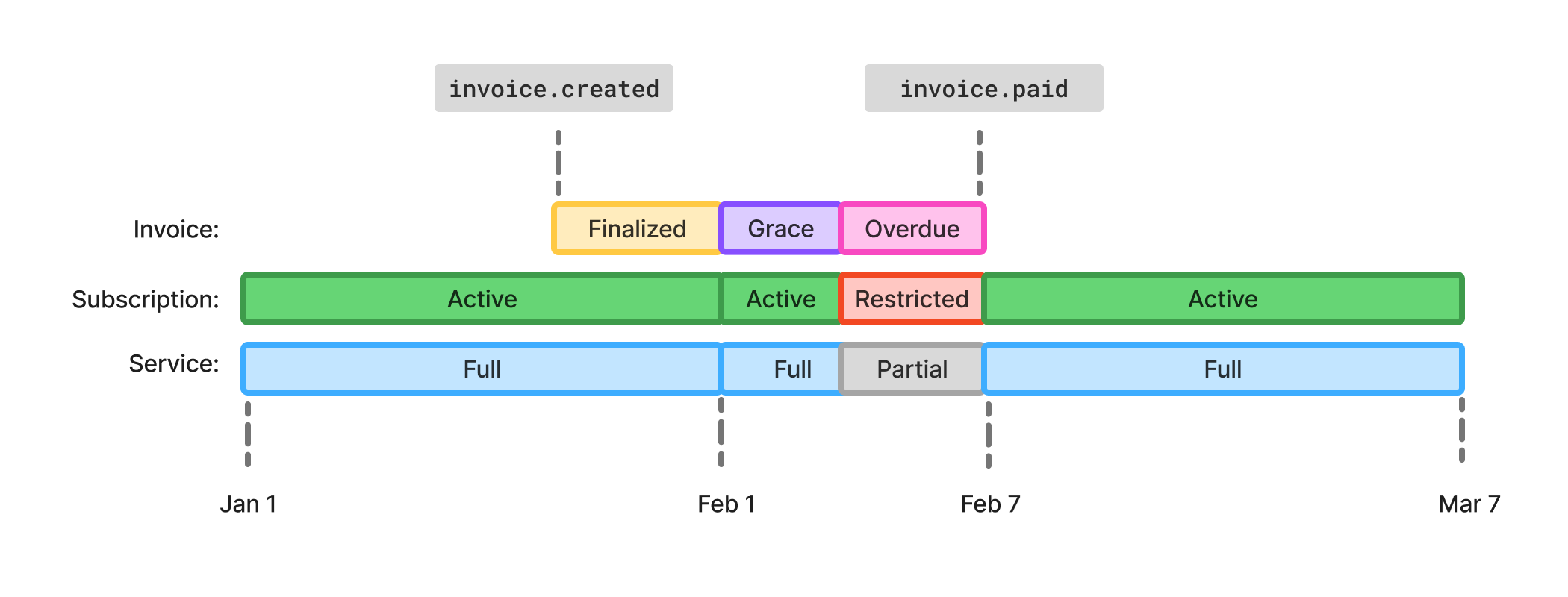
When you fail to collect payments for recurring invoices, you can decide how much time to wait and reattempt
to collect the funds before the subscription is automatically ended. This recovery period is composed
of a grace period, followed by an overdue period. You can choose the length of both or disable them completely.
### Grace Period
The grace period starts immediately at renewal and allows subscribers to retain complete access to their
plan while you attempt to collect payment.
It can be configured at the project level using the `gracePeriodDays` setting,
but can be overridden per subscription when a different delinquency configuration is needed for specific users.
In either case, the respective settings are applied when the grace period starts,
and further changes do not affect ongoing invoices, only future ones.
When subscribers pay during this period, the renewal date stays the same and subscriptions remain in
`active` status. If payment isn't collected by the end of the grace period, the invoice becomes overdue
and the overdue period begins.
We always wait at least 20 hours after an invoice is finalized before considering it overdue, regardless
of your settings. This gives users enough time to make payments, even when delays occur during invoice
processing.
### Overdue Period
After the grace period ends, the overdue period begins. During this time, you can decide whether subscribers
retain full access to their plan or face restrictions on their actions and allowances to reduce costs
and encourage payment.
In the same way as the grace period, the duration can be configured using the `overduePeriodDays`
setting, and the action using the `overdueAction`, `restrictBehavior`, and `restoreBehavior` settings,
at the project level or overridden per subscription.
In either case, the respective settings are applied when the overdue period starts,
and further changes do not affect ongoing invoices, only future ones.
You can choose how long this period lasts or skip it entirely, which ends subscriptions immediately.
Subscribe to the `invoice.willBeOverdue` and `invoice.overdue` events to be notified when this happens.
The `invoice.willBeOverdue` event is sent 24 hours before the overdue period starts.
If settings affecting the start of the overdue period change during these 24 hours,
the event timing may not align with the new settings.
## Restriction
During the overdue period, you can reduce subscription connectivity by restricting subscriptions. Restricted
subscriptions have a `restricted` status, limited allowances and cannot take actions such as replacing
a SIM or changing their base plan. We currently support three restriction modes that can be configured
using the `restrictBehavior` setting:
- **Incoming only**: Can only receive incoming calls and SMS, without being able to make outgoing calls, send SMS, or use data
- **Talk & Text**: Can make calls and send SMS using the same limits as the original plan, but cannot use data
- **Throttled Data**: Can make calls and send SMS using the same limits as the original plan, and use up to 1GB of data with speed throttled to 256kbit/s
Once overdue invoices are paid, subscriptions are automatically restored and become active again. You can
subscribe to the `subscription.restricted` and `subscription.restored` events to take action when this happens.
### Resetting the renewal date
When subscriptions are restored, you can choose whether to maintain the original renewal date or reset
it to provide users with a full period of connectivity using the `restoreBehavior` setting. When the date
is reset, the period anchor changes to the current moment, ending the current period and creating a new one immediately.
We also credit the original invoice and issue a new one that accurately reflects the new period and renewal date.
1. **Old invoice credited**: A credit note is issued for the original paid invoice with `creditTo: userBalance`. You don't need to take any action on this credit note.
2. **New invoice issued**: A new invoice is created for the new period with `reason: subscriptionRestore`. You don't need to take any action on this invoice either.
The new invoice is immediately paid using the credit from the previous invoice, which means that you
don’t need to take any action to handle the credit note or invoice.
Restoring a subscription while resetting the renewal date permanently changes the subscription renewal
schedule, shifting the period anchor to the restoration time. All future billing periods and renewals
will be based on this new date. You can find information about the new period in the `subscription.restore` event.
## Choosing the right configuration
By combining advance invoicing with grace and overdue periods, you can create flexible billing scenarios
that fit your desired experience. Here are some common configurations:
- Invoice at renewal and provide a grace period with full connectivity
- Invoice a few days before renewal and restrict connectivity while payments are not made
- Invoice a few days before renewal and end unpaid subscriptions right away
To decide how many days in advance to create invoices, how long the grace and overdue periods should
be, and which action to take when an invoice becomes overdue, consider these factors:
- Estimate the average time it takes to collect funds from your users.
- Account for potential delays, such as unexpected downtime.
- Consider how much time your users typically need to resolve payment issues.
- Assess how subscription termination impacts your user experience.
## Limitations
- Invoices cannot be issued more than one period length in advance.
- Invoices are not issued in advance if unpaid renewal invoices already exist.
- The combined grace and overdue periods cannot exceed the plan period length.
- Changes on the delinquency settings only affect future invoices.
- Restriction is not yet supported on all providers.
- Connectivity may be lost for up to 30 minutes during restriction and restoration.